We audit a lot of law firm Google Ads accounts. The same seven problems appear over and over, and together they typically account for somewhere between a quarter and half of the budget producing nothing.
None of them are exotic. All of them are fixable in an afternoon.
1. Sending Paid Traffic to the Homepage
This is the most common and most expensive error in legal PPC. Someone searches "DUI lawyer Pasadena," clicks an ad, and lands on a homepage that opens with the firm's history and lists six practice areas.
A homepage speaks to everyone, which means it speaks to nobody specifically. The visitor has to find the DUI information themselves, and a meaningful share will not bother.
The fix: a dedicated landing page per campaign, with a headline that echoes the search query, no site navigation, and one clear action. Firms that make this change alone typically see conversion rates move from the low single digits into the 8–12% range.
2. No Negative Keyword List
An account without negatives is paying legal-rate clicks for job seekers, law students, people looking for free legal aid, and DIY searchers hunting for forms.
Open the search terms report on any unmanaged legal account and you will find queries like "paralegal jobs near me," "how to become a lawyer," "free bankruptcy forms," and "legal aid society." Every one of those cost real money.
The fix: build a universal negative list covering jobs, education, free and pro bono, DIY forms, and definitions, then add practice-specific negatives. Review the search terms report weekly and keep adding.
3. Everything in One Campaign
One campaign, one ad group, two hundred keywords, one budget. It is the default structure when nobody has thought about structure, and it makes management impossible.
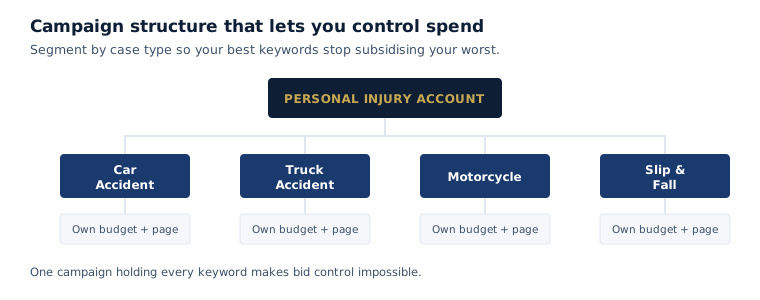
With everything pooled, you cannot shift budget toward the case types that sign or away from the ones that only generate calls. Your best keywords subsidize your worst, invisibly.
The fix: separate campaigns by case type, each with its own budget and its own landing page. A personal injury account should have distinct campaigns for car accidents, truck accidents, motorcycle, and slip and fall.
4. No Call Tracking
The majority of legal PPC conversions are phone calls. An account tracking only form submissions is blind to most of what it produced, which means the optimization is being done on partial data.
The fix: call tracking with dynamic number insertion, conversion actions configured for calls over a meaningful duration, and ideally a feedback loop from intake so the account learns which keywords produce signed cases rather than merely ringing phones.
5. Broad Match Before the Account Is Ready
Broad match can work well in a mature account with a large negative list and substantial conversion data feeding automated bidding. In a new legal account it is expensive tuition.
Google will show your ad for queries that are semantically adjacent and commercially useless, and you will pay premium legal rates for each one.
The fix: start with phrase and exact match. Build the keyword list from what the search terms report reveals. Introduce broad match only after negatives are mature and conversion tracking is producing reliable signal.
6. Loose Geographic Targeting
Two settings cause most geographic waste. The first is leaving the default location option, which targets people interested in your area as well as people in it — meaning someone in another state researching your city can trigger your ad.
The second is targeting far beyond where you actually want cases, usually out of a vague hope that a broader net catches more. It catches calls from people you cannot serve.
The fix: set location targeting to people in your target locations, define the radius around where you genuinely want cases, and exclude areas you cannot serve. There is also a compliance dimension: advertising into states where you are not admitted can implicate bar rules.
7. Nobody Answers the Phone
This is not technically an ads mistake, and it wastes more money than any of the six above.
A campaign producing forty calls a month where eleven go to voicemail has spent roughly a quarter of the budget generating cases for whoever the caller dialed next. In criminal defense and personal injury, where searches happen at every hour, the after-hours gap is often larger than the business-hours one.
The fix: answer every call during business hours, use an answering service that takes real information after hours, and check the answered-call rate in your call tracking monthly. If you cannot staff it, reduce the budget until you can — paying for calls nobody answers is the most expensive thing in this list.
Free audit of your existing ad account
We review structure, search terms, wasted spend, landing page match, and tracking, then tell you plainly what is broken and what it is costing.
Our PPC guide for lawyers covers correct account structure end to end.
Common Questions
The most common cause is sending paid traffic to a homepage rather than a dedicated landing page matching the search query. The second most common is attracting the wrong traffic through missing negative keywords or loose geographic targeting. Check your landing page match and your search terms report before adjusting bids.
In unmanaged accounts we commonly find a quarter to half of spend producing nothing, usually through missing negative keywords, homepage traffic, loose geography, and unanswered calls. Most of that is recoverable within a few hours of work.
Not in a new account. Broad match can perform well in a mature account with an extensive negative list and substantial conversion data feeding automated bidding. Starting there means paying premium legal click rates to discover which queries are irrelevant. Begin with phrase and exact match and expand from search terms data.
Start with job-related terms like jobs, salary, hiring, and paralegal; education terms like how to become and law school; free-service terms like free, pro bono, and legal aid; and DIY terms like forms, template, and do it yourself. Then add practice-specific negatives based on what your search terms report reveals.